26 de Enero 2006
Completando TextView 2 parte
El widget TextView alcance su segunda revision en T-Gtk
Ya esta actualmente terminada la 2 implementacion que se lleva a cabo al widget T-Gtk.
Faltan muchas mas cosas, pero de momento, dejaremos este widget para centrarnos en otros asuntos que más nos urgen en estos momentos.
He terminado de implementar que todo se realice a traves de programacion orientado al objeto, para que sea mas rápido y fácil su uso.
Ayer tuve ocasion de poder actualizar T-Gtk para mi GNU/Linux Debian , y pude comprobar que tal funciona en los dos sistemas.
La verdad, es que es sorprendente el trabajo realizado por la gente de Gtk, Gnome, GNU, y el software libre en general.
En fin, para no aburrir , dejo aqui las imagenes:
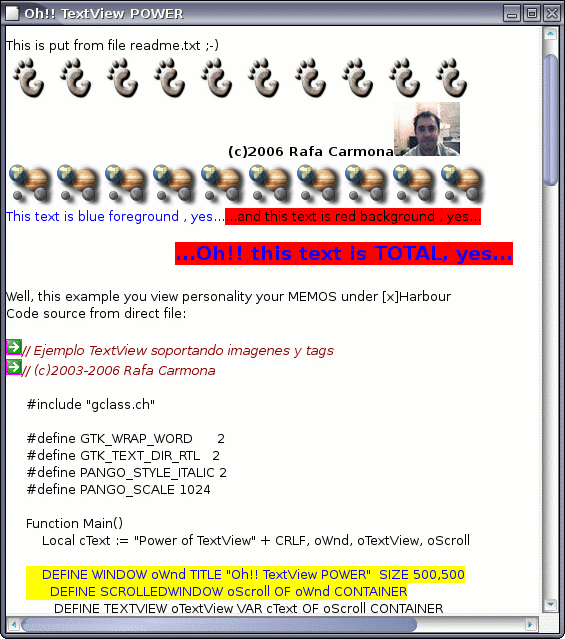
T-GTK en GNU/Linux
El mismo codigo, pero bajo Windows:
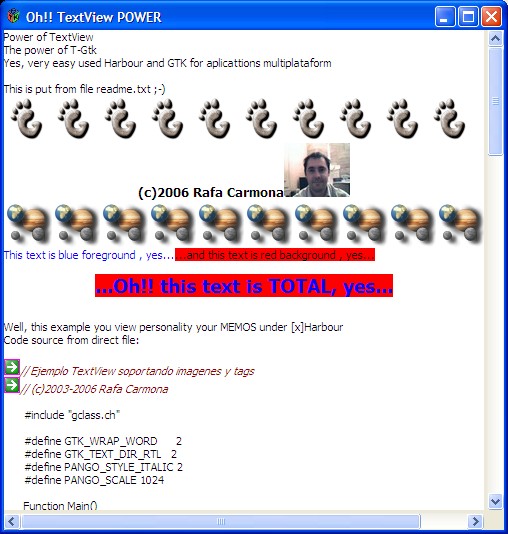
Podeis apreciar que es identico ;-), es la gracia de programar una vez y compilar en distintos entornos.
El codigo fuente, tanto en un sistema como en otro, y que estará disponible en la proxima liberacion de T-Gtk :
// Ejemplo TextView soportando imagenes y tags // (c)2003-2006 Rafa CarmonaEscrito por Rafa Carmona a las 26 de Enero 2006 a las 02:22 PM#include "gclass.ch"
#define GTK_WRAP_WORD 2
#define GTK_TEXT_DIR_RTL 2
#define PANGO_STYLE_ITALIC 2
#define PANGO_SCALE 1024Function Main()
Local cText := "Power of TextView" + CRLF, oWnd, oTextView, oScrollDEFINE WINDOW oWnd TITLE "Oh!! TextView POWER" SIZE 500,500
DEFINE SCROLLEDWINDOW oScroll OF oWnd CONTAINER
DEFINE TEXTVIEW oTextView VAR cText OF oScroll CONTAINER
Create_Text( oTextView )ACTIVATE WINDOW oWnd CENTER
RETURN NIL
STATIC FUNCTION Create_Text( oTextView )
Local oFile := gTextFile():New( "readme.txt", "R" )
Local nWhere := 1
Local aStart := Array( 14 ),oImage, j, cLine// Example insert from AT_CURSOR and source file txt
oFile:Goto( 1 )
while !oFile:lEoF
cLine := oFile:Read()
oTextView:Insert( cLine )
oFile:Goto( ++nWhere )
end while
oFile:Close()// Ok, i put my image in TextView ;-)
oTextView:oBuffer:GetIterAtOffSet( aStart, -1 )
DEFINE IMAGE oImage FILE "../../images/gnome-foot.png" LOAD
For j := 1 To 10
oTextView:Insert_Pixbuf( aStart, oImage )
Next
// Ops, new line ;-)
oTextView:Insert( CRLF )
// Ah! Tags examples....
oTextView:oBuffer:GetIterAtOffSet( aStart, -1 )
oTextView:CreateTag( "heading", { "weight", 700,;
"size", 10*PANGO_SCALE,;
"justification", GTK_JUSTIFY_CENTER } )
oTextView:Insert_Tag( "(c)2006 Rafa Carmona" , "heading", aStart )
// New image
DEFINE IMAGE oImage FILE "../../images/rafa2.jpg" LOAD
oTextView:Insert_Pixbuf( aStart, oImage )
// Ops, new line ;-)
oTextView:Insert( CRLF )
// Eh!, you localicate you position with GetIterAtOffset
oTextView:oBuffer:GetIterAtOffSet( aStart, -1 )
DEFINE IMAGE oImage FILE "../../images/gnome-gsame.png" LOAD
For j := 1 To 10
oTextView:Insert_Pixbuf( aStart, oImage )
Next// Ops, new line ;-)
oTextView:Insert( CRLF )
oTextView:oBuffer:GetIterAtOffSet( aStart, -1 )
oTextView:CreateTag( "blue_fore",{ "foreground", "blue" } )
oTextView:CreateTag( "red_back", { "background", "red" } )oTextView:CreateTag( "blue_and_red", { "background", "red", "foreground", "blue",;
"justification", GTK_JUSTIFY_CENTER,;
"weight", 700, "size", 14*PANGO_SCALE } )oTextView:Insert_Tag( "This text is blue foreground , yes..." , "blue_fore", aStart )
oTextView:Insert_Tag( "...and this text is red background , yes..."+ CRLF + CRLF,;
"red_back", aStart )
oTextView:Insert_Tag( "...Oh!! this text is TOTAL, yes..."+CRLF+CRLF ,;
"blue_and_red", aStart )// Put Code source in TexView.
oTextView:CreateTag( "window", { "background", "yellow",;
"foreground", "blue",;
"left_margin", 20,;
"right_margin", 20 } )
oTextView:CreateTag( "window_back", { "left_margin", 20, "right_margin", 20 } )
oTextView:CreateTag( "comment", { "style", PANGO_STYLE_ITALIC,;
"left_margin", 20,;
"right_margin", 20,;
"foreground", "darkred" } )
oTextView:Insert( "Well, this example you view personality your MEMOS under [x]Harbour" +CRLF )
oTextView:Insert( "Code source from direct file: " + CRLF + CRLF)oFile := gTextFile():New( "textview.prg", "R" )
nWhere := 1oTextView:oBuffer:GetIterAtOffSet( aStart, -1 )
oFile:Goto( 1 )
while !oFile:lEoF
cLine := oFile:Read()
DO CASE
CASE "WINDOW" $ cLine
oTextView:Insert_Tag( cLine , "window", aStart )
CASE "//" $ cLine
DEFINE IMAGE oImage FILE "../../images/header.png" LOAD
oTextView:Insert_Pixbuf( aStart, oImage )
oTextView:Insert_Tag( cLine , "comment", aStart )
OTHERWISE
oTextView:Insert_Tag( cLine , "window_back", aStart )
ENDCASE
oFile:Goto( ++nWhere )
end while
oFile:Close()Return NIL